| PRED 356 | Methods
of Science and Mathematics Teaching
Chapter 8: Computer Assisted Instruction (CAI) |
1.1 What is CAI?
Instructional process includes the phases that are presenting information to students, guiding the students’ first interaction with material, practicing the material to enhance fluency and retention, and testing students to determine what they should do next.
This model can also be applied to CAI. That is not to say that the computer must always fulfill all the phases of instruction. It may serve any combination of the four phases. Such as;
Computer may present initial information, after which the student receives guidance from an instructor and practices using a workbook. The student may learn initial information from a lecture, after which the computer is used to practice some parts of the material to fluency. The computer may be used for the first three phases, with testing being done in the traditional way by the instruction.So CAI can be defined as the use of a computer to provide tests and to facilitate or to present of instruction in the form of drill and practice, tutorials, simulations and instructional games..
Tutorials Drills Simulations Games Tests 1.2.1. Tutorials
Tutorials are programs that, in general, engage in the first two phases of instruction. They take the role of the instructor by presenting information and guiding the learner in initial acquisition.
They are appropriate for presenting factual information, for learning rules and principles, or for learning problem solving strategies.
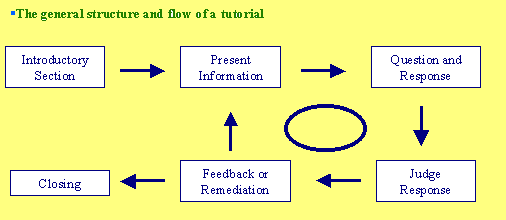
It begins with an introductory section that informs the student of the purpose and nature of the lesson. After that, a cycle begins. Information is presented and elaborated. A question is asked that the student must answer. The program judges the response to assess student comprehension, and the student is given feedback to improve comprehension and future performance.
At the end of each iteration, the program makes a sequencing decision to determine what information should be treated during the next iteration. The cycle continues until the lesson is terminated by either the student or the program.
Example: Tutorial for the Matlab.
Computerized drills used primarily for the third aspect of the instructional process, practicing. They are applicable to all types of learning, assuming that initial presentation and guidance have already occurred.
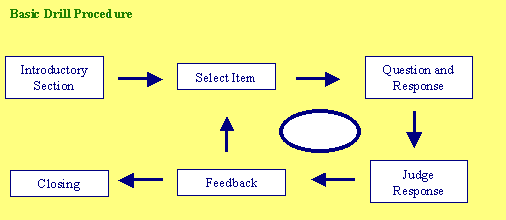
Procedure is almost the same of the tutorials. The difference is that there is selection of the item instead of the presentation of the information at the second step. Judgment and feedback is related to the item and its related behavior.
Drills may be applied to simple paired-associate learning, to simple problem solving, such as arithmetic facts, and to complex problem solving, such as problems in the physical and social sciences.
Computer based drills can be made more interesting through competition, the use of graphics, informing the student progress, and introducing variety. The use of interactive graphics can increase the effectiveness of drills in ways not possible with workbooks or flashcards. The use of graphics as a prompt, as a context, as a motivator, and as feedback can all serve to make computerized drills more effective than others.
The sophisticated queuing methods possible on a computer possess great potential for increasing drill efficiency and effectiveness. Immediate corrective feedback is possible with flashcards but not with most workbooks. If you peek at the answers in a computerized drill, meaning that you ask to see the answer, the program considers your answer wrong and you will be forced to practice that item more.
It also permits permanent records for the student, the teacher, and the author about student performance and item quality.
View the drill about "area of square" or the drill about "the decimal numbers".